The first content site I ran on an AI WordPress content pipeline taught me more from its failures than its wins. One malformed batch of structured data produced thousands of Search Console errors overnight. An older script once pasted the same 300 off-topic words into more than twenty live posts before I caught it. Wide tables silently broke the layout on phones for weeks. None of that was the AI’s fault, and none of it was WordPress’s fault — it was the pipeline around them. This is the system I use now: what it does, where a human stays in the loop, and the rules it enforces so those specific mistakes can’t happen twice.
What an AI WordPress content pipeline actually is
An AI WordPress content pipeline is not a button that publishes articles for you. It’s a chain of steps — research, drafting, human review, validation, scheduling, and post-publish checks — where AI does the heavy lifting on the parts that scale badly by hand, and a person owns the parts that need judgment. The output lands in WordPress the way any editor would want it: clean HTML, valid structured data, correct internal links, and images with real alt text.
The distinction matters because Google doesn’t punish AI writing; it punishes low-value content produced at scale to game search. A pipeline can go either way. Built carelessly, it mass-produces thin pages and digs a hole you spend months climbing out of. Built with a review gate and real evidence, it lets one person run a serious content operation without cutting the corners that get sites buried. Everything below is aimed at the second outcome.
“Lands in WordPress cleanly” is doing a lot of work in that first paragraph, so it’s worth being concrete. The output of the pipeline is a block of HTML I can paste straight into the editor: headings with anchors, a table of contents, responsive tables, structured data, and image placeholders in the right places. Getting that format right by hand for every post is exactly the kind of repetitive, easy-to-botch work that a pipeline should own — and exactly the work I used to get wrong.
Why I stopped publishing WordPress posts by hand
For a long time I ran a Korea-travel affiliate site I still maintain entirely by hand: write in the editor, paste in schema, set the SEO fields, check the preview, publish, request indexing, repeat. Each post took an afternoon of mechanical work on top of the writing, and the mechanical work was exactly where I made mistakes when I was tired. A missed table wrapper here, a malformed schema block there. The cost wasn’t the time as much as the errors that time-pressure produced.
Moving that mechanical layer into a pipeline changed the economics. The research-to-publish cycle that used to eat an afternoon now runs in a fraction of it, and — more importantly — the boring, error-prone steps became deterministic. A script wraps every table the same way every time. A validator refuses to let broken structured data reach the live site. The writing still takes real effort, because that’s the part worth spending effort on. The pipeline just stops me from fumbling the last mile.
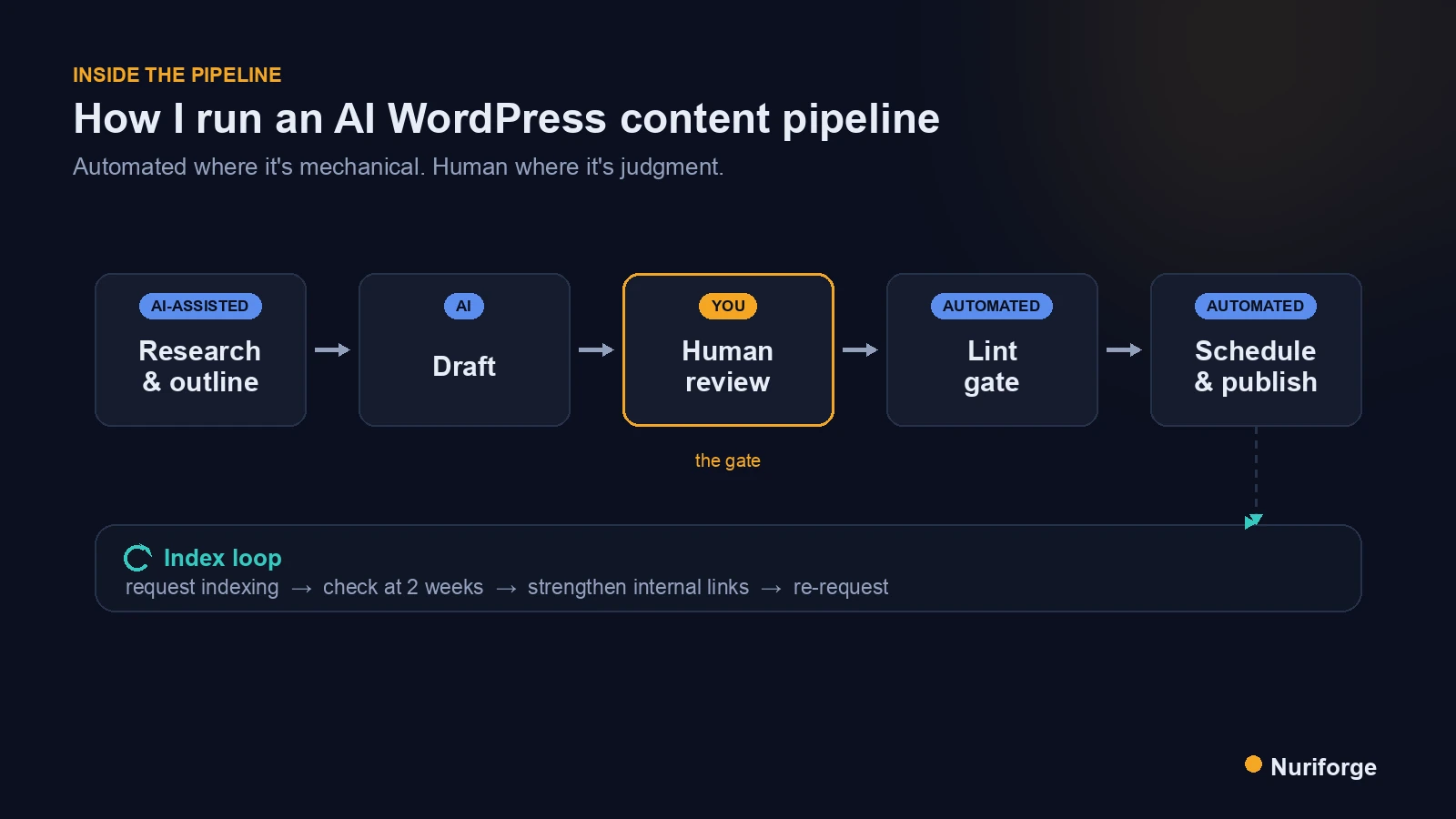
How I run my AI WordPress content pipeline, stage by stage
The pipeline is a straight line with one hard gate in the middle. Nothing reaches WordPress until a person has reviewed it and an automated check has passed. Here’s each stage.
Research and outline
I start from a real topic I have evidence for — a project I built, a problem I hit, a before-and-after I can prove. AI helps gather sources and shape an outline, but the angle comes from first-hand work. If I don’t have genuine evidence for a claim, that’s a signal to write about something else, not to invent it.
Draft
AI produces a first draft against a fixed voice and structure: intro hook, sectioned body, a comparison table where it helps, an FAQ, and a personal close. The draft is a starting point, not a finished article. It gets the shape right so I can spend my time on substance rather than scaffolding.
Human review
This is the gate the whole thing is built around. I read every draft, correct anything that’s wrong, cut filler, and add the specifics only I know — the exact command, the real number, the thing the docs don’t mention. Nothing gets published that I haven’t personally stood behind. That review is what keeps the site on the right side of Google’s line between helpful content and scaled abuse.
Validate and schedule
A lint step checks the post against every rule before it’s allowed out (more on that below). Then it’s scheduled through the WordPress REST API rather than pasted by hand, which lets me queue posts at a steady pace instead of dumping them all at once. Scheduling through the API also means the same code that validates a post is the code that publishes it, so there’s no gap where a “final” manual edit can quietly reintroduce a problem the gate already caught. The publishing script also authenticates with its own revocable application password rather than the admin password — one line from the hardening checklist I run on self-hosted WordPress, and the line that matters most once a script is allowed to write to your site.
Publish and the index loop
After a post goes live I request indexing, then check two weeks later whether it actually got indexed. If it didn’t, I go back to the internal link map I build from the live site, strengthen its links from stronger pages, and ask again. An unindexed post earns nothing, so this loop is where a lot of the real SEO work happens — long after “publish.”
This is also why the pipeline’s pace is deliberately slow. It can produce far more drafts than I publish, but flooding a new site with posts faster than Google will index them just stacks up “discovered, not indexed” pages that drag the whole domain’s quality signal down. So the pipeline’s real job at the end isn’t speed — it’s restraint plus follow-through: publish steadily, confirm each post actually made it into the index, and spend the freed-up time strengthening what’s already live rather than piling on more. A small site fully indexed beats a large one that Google decided wasn’t worth crawling.
What I automate and what stays human
The single most useful decision in this whole system is drawing a clear line between the two. Automate the mechanical and repeatable; keep judgment, experience, and final approval human. Get that line wrong in either direction and you either burn out doing robot work or you ship things you’d never have approved. Here’s how I split it.
| Stage | Automated | Human |
|---|---|---|
| Topic & angle | Source gathering, outline | Choosing the topic; the real-experience angle |
| Drafting | First draft to a fixed structure | Rewriting, cutting filler, adding specifics |
| Facts & evidence | — | Verifying every claim, number, and screenshot |
| Formatting | Table wrapping, schema, HTML cleanup | Spot-check on mobile |
| Validation | Lint gate blocks on any failure | Reading the failures, deciding fixes |
| Publishing | REST scheduling at a set pace | Approving the final post |
| After publish | Indexing request, link-map refresh | Reading Search Console, deciding what to strengthen |
Notice that every row with a judgment call keeps a human in it. That’s deliberate. The pipeline is fast because it never asks me to do repetitive formatting, and it’s trustworthy because it never asks a model to make a call that needs my experience. The one place sameness still creeps in is the prose itself — the same opening or the same anecdote resurfacing across posts — so a log of what has already been used sits in front of every draft: Anti-Repetition for an AI Writer: a Log That Never Repeats.
The rules the pipeline enforces on every post
The part that took longest to get right isn’t the drafting — it’s the validation gate. Every post has to pass an automated lint check before it can be published, and a failure blocks the post rather than warning and moving on. The checks exist because each one maps to a real failure I’ve lived through: structured data that broke, links that pointed nowhere, tables that shattered on mobile.
A few of the rules the gate enforces: structured data must be present and valid, and minified before it ever touches the live site; every table must be wrapped so it can’t push the page sideways on a phone; internal links must use final URLs, not redirect chains; and the focus keyword has to sit in the handful of places that matter without being stuffed everywhere else. I’ll break these down in dedicated posts — Enforce Writing Rules Twice: a Lint Gate and a Sanitizer and Why You Must Minify JSON-LD Before It Touches WordPress.
There’s a second layer behind the gate that’s easy to overlook: enforcing the same rules again at the moment of a live edit. A pre-publish check only sees the post once. But content gets edited after it’s live — a link swapped, a section added — and that’s exactly when a careful rule gets broken by accident. So the rules run twice: once before a post is allowed out, and again as a sanitizer on any live change, because the edit you make three months from now is the one most likely to slip.
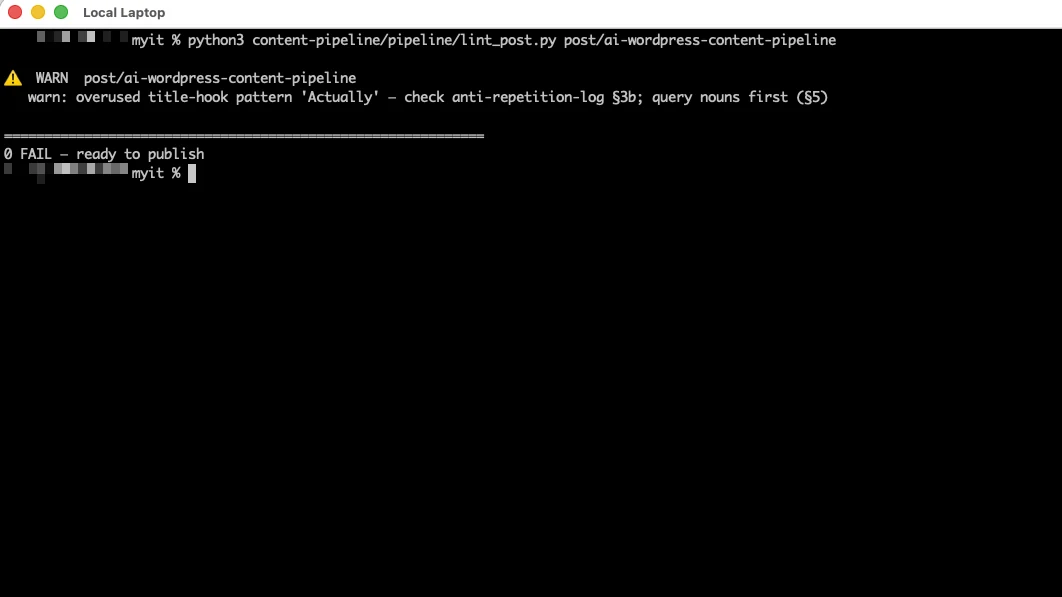
The reason the gate is automated rather than a checklist is simple: I don’t trust myself to run a checklist perfectly at eleven at night, and neither should you. A rule that lives only in your head is a rule you’ll skip under pressure. A rule the pipeline enforces is one you can’t.
The mistakes that shaped the pipeline
Almost every rule in this system is a scar. On that Korea-travel affiliate site I run, one malformed batch of JSON-LD schema produced thousands of Search Console errors that took real work to unwind — that’s why structured data is now validated across both published and scheduled posts before anything ships. I’ll tell that story in full in The JSON-LD Schema Errors That Flooded Search Console.
The same site is where an older, dumber pipeline once pasted the same block of off-topic text into more than twenty live posts, and where wide tables quietly broke the layout on mobile because a global stylesheet wasn’t rendering where I assumed it was. Each of those became a hard rule: no batch operation ships without a full re-scan of what is actually published — disk and live drift apart faster than you’d think — and every table carries its own inline wrapper so it can’t depend on a stylesheet that might not load. The pipeline I run today is mostly a list of things I refuse to get wrong again. If you’re building your own, I’d start there — with your own scars, not a generic checklist.
FAQ
Does an AI content pipeline get penalized by Google?
Not for being AI-assisted. Google penalizes low-value content produced at scale to manipulate search, regardless of how it’s made. A pipeline with a genuine human review step and real first-hand evidence is on the right side of that line; one that mass-produces thin pages is not.
How much of this is automated versus written by a human?
The mechanical parts — outlining, first drafts, formatting, validation, scheduling — are automated. The judgment parts — the topic, the angle, verifying facts, cutting filler, and final approval — are human. Nothing publishes that I haven’t personally reviewed.
Do I need to code to run a pipeline like this?
Some scripting helps, because the highest-value pieces are the validation gate and REST-based publishing. But you can adopt the ideas incrementally: start with a fixed structure and a manual pre-publish checklist, then automate the checks that keep catching you.
How many posts a week can you safely publish this way?
Fewer than the pipeline can produce. I cap new posts to a steady pace — a couple a week — because publishing faster than Google indexes just stacks up un-indexed pages and drags the whole site down. The bottleneck is indexing, not drafting.
Why WordPress instead of a custom-built blog?
Because the bottleneck is content and indexing, not the platform. Hand-building a CMS is time not spent writing, and readers credit the work you show, not your blog engine. I keep the content on WordPress and build separate apps only when an app is genuinely the point.
My Thoughts
If I had to compress this into one idea, it’s that the pipeline isn’t the interesting part — the review gate is. AI made it cheap to produce drafts and easy to automate the boring formatting, but neither of those is what makes a content site worth reading or worth ranking. What makes it work is a person who has actually done the thing, standing behind every published word, backed by a system that won’t let the old mistakes through. Build the guardrails from your own scars, keep yourself in the loop where judgment lives, and let the machine handle the parts that were never worth your attention. That’s the whole game.