Page cache, object cache, CDN — WordPress caching is really four different mechanisms wearing one word, and knowing which does what is the difference between a fast site and a mysteriously stale one. Most guides tell you to install a caching plugin and flip it on; almost none explain what’s actually being cached, what work each layer skips, or why your edit sometimes refuses to show up. After two decades of chasing latency through systems, I think about caches by asking one question of each: what expensive step does this let me not do again? Answer that for all four layers and caching stops being magic and starts being a stack you can reason about.
The four caches, and what each one shortcuts
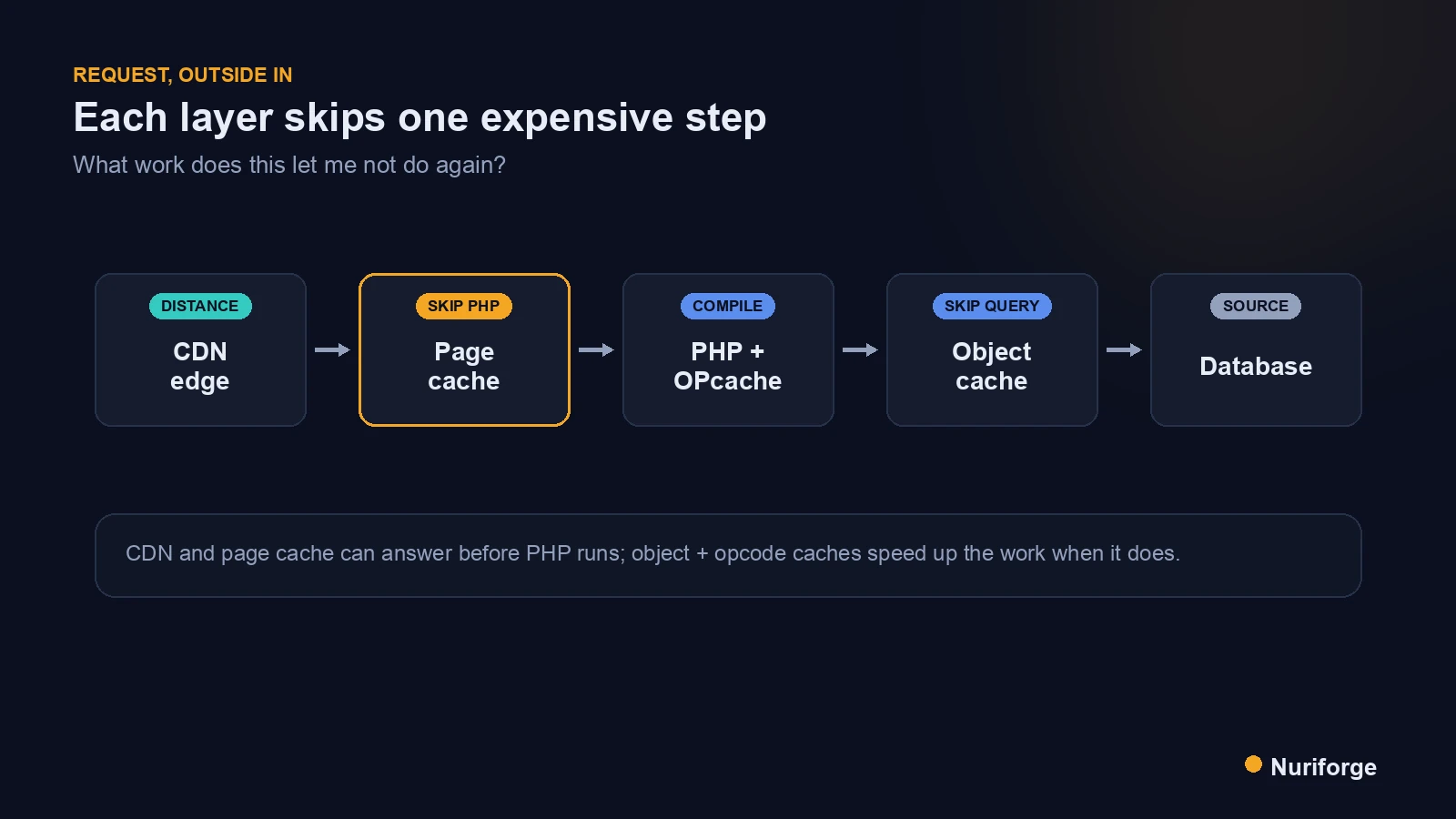
Serving a WordPress page normally means a chain of expensive steps: a request arrives, PHP runs, WordPress makes a pile of database queries, assembles HTML, and sends it back. Every cache layer exists to skip one link in that chain. Once you see them as “which step does this avoid,” the whole picture snaps into focus and the layers stop blurring together.
There are four, working roughly from the outside in. A content delivery network caches responses at the edge, close to the reader. A page cache stores the finished HTML so WordPress doesn’t have to build it again. An object cache stores the results of database queries so PHP doesn’t re-run them. And an opcode cache keeps compiled PHP in memory so the server doesn’t recompile your code on every request. Each targets a different bottleneck, and understanding how HTTP caching works at the protocol level ties the outer layers together.
The reason WordPress caching confuses people is that these get sold as one feature. A plugin might handle page and object caching, your host might add opcode caching, and a CDN sits in front of all of it — four mechanisms, one vague label. Pull them apart and each one is simple.
Page cache: skip PHP entirely
Page caching is the heaviest hitter, because it skips the most work. The first time a visitor requests a page, WordPress builds the full HTML and the page cache stores that finished document. Every subsequent visitor gets the stored HTML directly — no PHP execution, no database queries, none of it. You’ve turned a dynamic request into what is essentially serving a static file.
That’s why page caching produces the biggest speed jump for a content site, where most visitors see identical pages. An article doesn’t change between one anonymous reader and the next, so building it fresh every time is pure waste. The catch is baked into the strength: because the whole page is frozen, anything that should differ per user or update the instant you edit is now working against a snapshot. Page caching is perfect for content that’s the same for everyone and awkward for anything personalized, which is exactly the tension the purge step exists to manage.
Object cache: skip repeated database work
A persistent object cache works one layer deeper, on the database queries themselves. WordPress constantly asks the database the same things — options, menus, query results — and an object cache like Redis or Memcached stores those answers in memory so repeated lookups don’t hit the database again. WordPress has always had a built-in object cache, but by default it only lasts the length of a single request; making it persistent is what lets those results survive between requests.
This matters most exactly where page caching can’t help: logged-in users, dynamic pages, admin screens, and anything that has to run PHP fresh. Page caching short-circuits the whole request for anonymous visitors, but the moment a request can’t use the page cache, the object cache is what keeps it from hammering the database. On a busy site or a heavy dashboard, a persistent object cache is often the difference between snappy and sluggish. The two layers are complementary, not competing — page cache for the anonymous majority, object cache for everything that slips past it.
Opcode cache and the CDN at the edge
The opcode cache is the one you rarely touch, and that’s fine. PHP is compiled on the fly, and without help the server recompiles your code on every single request. OPcache keeps the compiled bytecode in memory so that recompilation happens once, not thousands of times. It’s usually enabled at the server level, needs little tuning, and just quietly makes every PHP request cheaper — including the ones no other cache can help.
The CDN sits at the opposite end, out at the edge. It caches your content across a network of servers geographically close to readers, so a visitor far from your origin gets bytes from a nearby node instead of a slow trip across the world. It’s most obviously valuable for static assets — images, CSS, JavaScript — and with the right configuration it can cache full pages at the edge too, essentially a page cache distributed worldwide. The four layers stack cleanly: the CDN answers from the edge, the page cache answers before PHP, the object cache speeds up PHP when it must run, and OPcache makes that PHP cheaper still.
Why caching bites you: the edit that won’t show
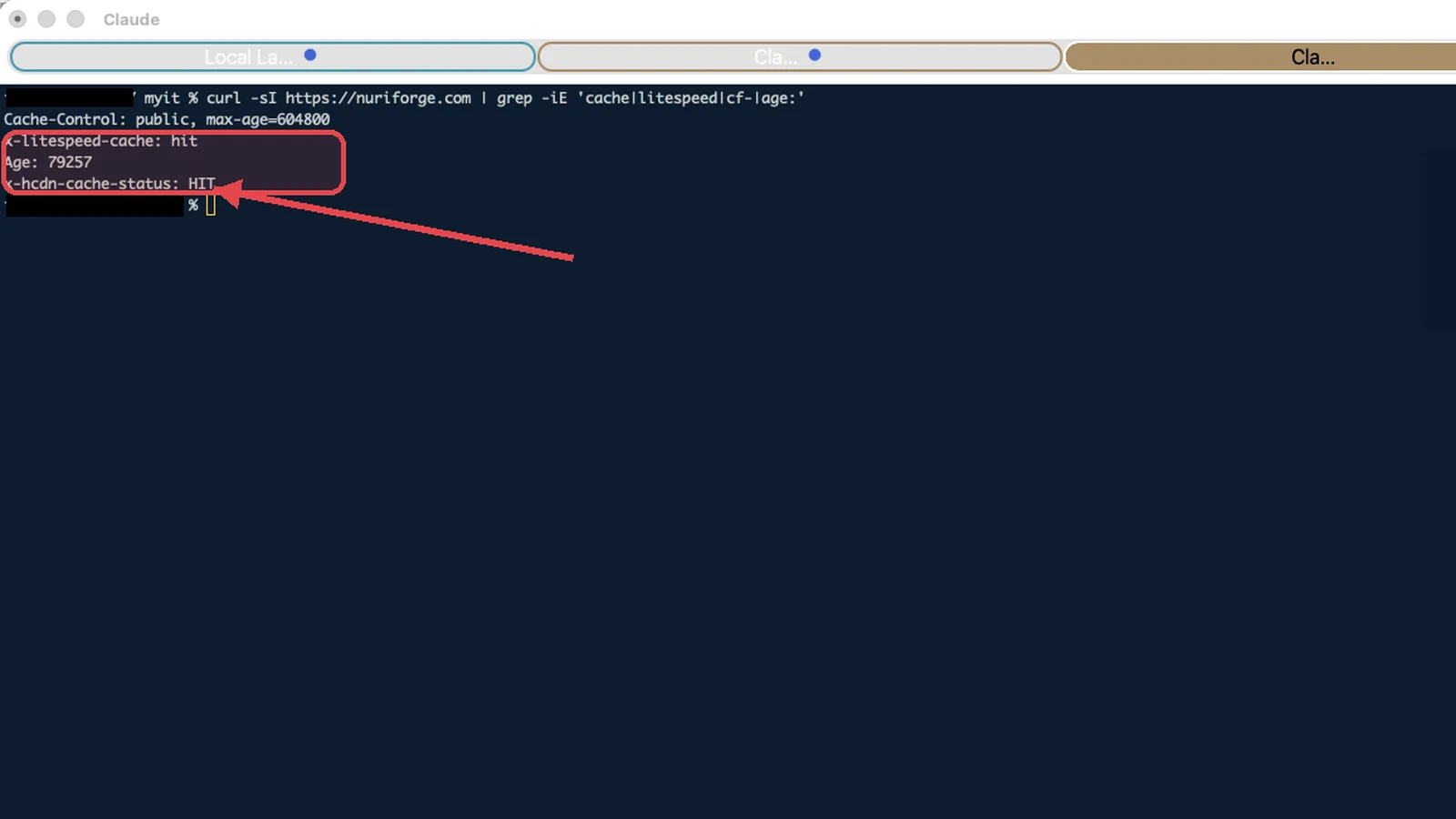
Here’s the failure mode that sends people searching in a panic: you edit a post, load it, and see the old version. Nothing is broken — a cache is doing exactly its job, handing back the stored copy while your change sits behind it. That gap between “I saved it” and “the world sees it” is the single most common caching confusion, and it’s a feature, not a bug.
The fix is purging: telling the relevant layer to discard its stored copy so the next request rebuilds fresh. Most caching plugins purge automatically when you edit through the WordPress admin, but automation has edges. If you change content outside the normal flow — a direct database update, an edit through the REST API, a deploy that swaps files — the cache may not know anything changed, and you’ll serve stale content until you purge by hand. This is exactly the kind of thing I account for in the content pipeline I run: any change made outside the editor has to trigger a purge, or the freshest content and the stalest cache end up on the same page. And remember the layers stack — a CDN can still hold an old copy after your origin page cache has cleared, so a stubborn stale page sometimes means purging more than one layer.
The caching layers side by side
The clean way to hold all four in your head is by what each stores and what it saves you. Read this as the same request passing through each layer from the edge inward.
| Layer | What it stores | What it saves | Purge when |
|---|---|---|---|
| CDN | Responses at the edge | Distance and origin load | Content or assets change |
| Page cache | Finished HTML pages | All of PHP and the database | A cached page’s content changes |
| Object cache | Database query results | Repeated database queries | Underlying data changes |
| OPcache | Compiled PHP bytecode | Recompiling code each request | You deploy new code |
FAQ
What’s the difference between page cache and object cache in WordPress?
A page cache stores the finished HTML of a page so WordPress doesn’t run PHP or query the database to rebuild it, which is ideal for anonymous visitors seeing identical pages. An object cache stores individual database query results in memory so PHP doesn’t re-run them, which helps logged-in users and dynamic requests that can’t use the page cache. They work together rather than replacing each other.
Do I need a CDN if I already have WordPress caching?
They solve different problems. A page or object cache reduces work on your origin server, while a CDN reduces the physical distance between your content and the reader by serving from edge locations. If your audience is geographically spread out, a CDN meaningfully cuts latency even with a well-cached origin, and it can absorb traffic spikes your origin couldn’t.
Why doesn’t my edit show up after I save it?
A cache is serving the stored copy of the page while your change sits behind it. That’s the cache doing its job, not a bug. Purging the relevant layer discards the old copy so the next request rebuilds fresh; if you edited outside the normal admin flow, the cache may not have purged automatically and you’ll need to clear it yourself.
Is an object cache worth it for a small site?
It depends on how dynamic the site is. For a small, mostly anonymous content site, a page cache does the heavy lifting and a persistent object cache adds less. Object caching earns its keep on sites with many logged-in users, busy dashboards, or dynamic pages that constantly bypass the page cache and hit the database directly.
Does caching ever cause problems I should watch for?
The main one is stale content: an edit or update that doesn’t appear because a layer is still serving an old copy. Because the layers stack, a page can be cached in more than one place at once, so a stubborn stale page sometimes means purging both your page cache and your CDN. Content that must be personalized per user should also be excluded from full-page caching.
My Thoughts
Caching stopped being intimidating for me the day I quit treating it as one switch and started seeing four distinct shortcuts, each skipping a specific piece of expensive work. Once you can name what a layer stores and what it lets you avoid, both the speed and the surprises make sense: the speed is the work you’re not repeating, and the surprises are almost always a layer proudly serving a copy you forgot to invalidate. You don’t need to hand-tune all four to benefit. You just need to know which one is answering when a page loads instantly, and which one to clear when a change refuses to appear.