I run WordPress the way I run everything else in my infrastructure: in a container. Running WordPress in containers means the copy on my laptop and the copy in production are, image for image, the same build — same PHP version, same extensions, same config — instead of two hand-tuned servers that drift apart until “works on my machine” becomes a debugging session. Twenty years of operations taught me that most WordPress incidents aren’t code; they’re environment. This is how I package WordPress so local and prod stop disagreeing, what each container owns, and the traps that bite people the first week they try it.
Why I run WordPress in containers at all
The problem a container solves is drift. A traditional WordPress box accumulates history: a PHP extension someone installed by hand in 2022, a php.ini tweak that only lives on prod, a plugin that needs a library nobody documented. None of that is in version control, so you can’t recreate the server — you can only hope it keeps running. The day it doesn’t, you’re reverse-engineering your own machine at 2 a.m.
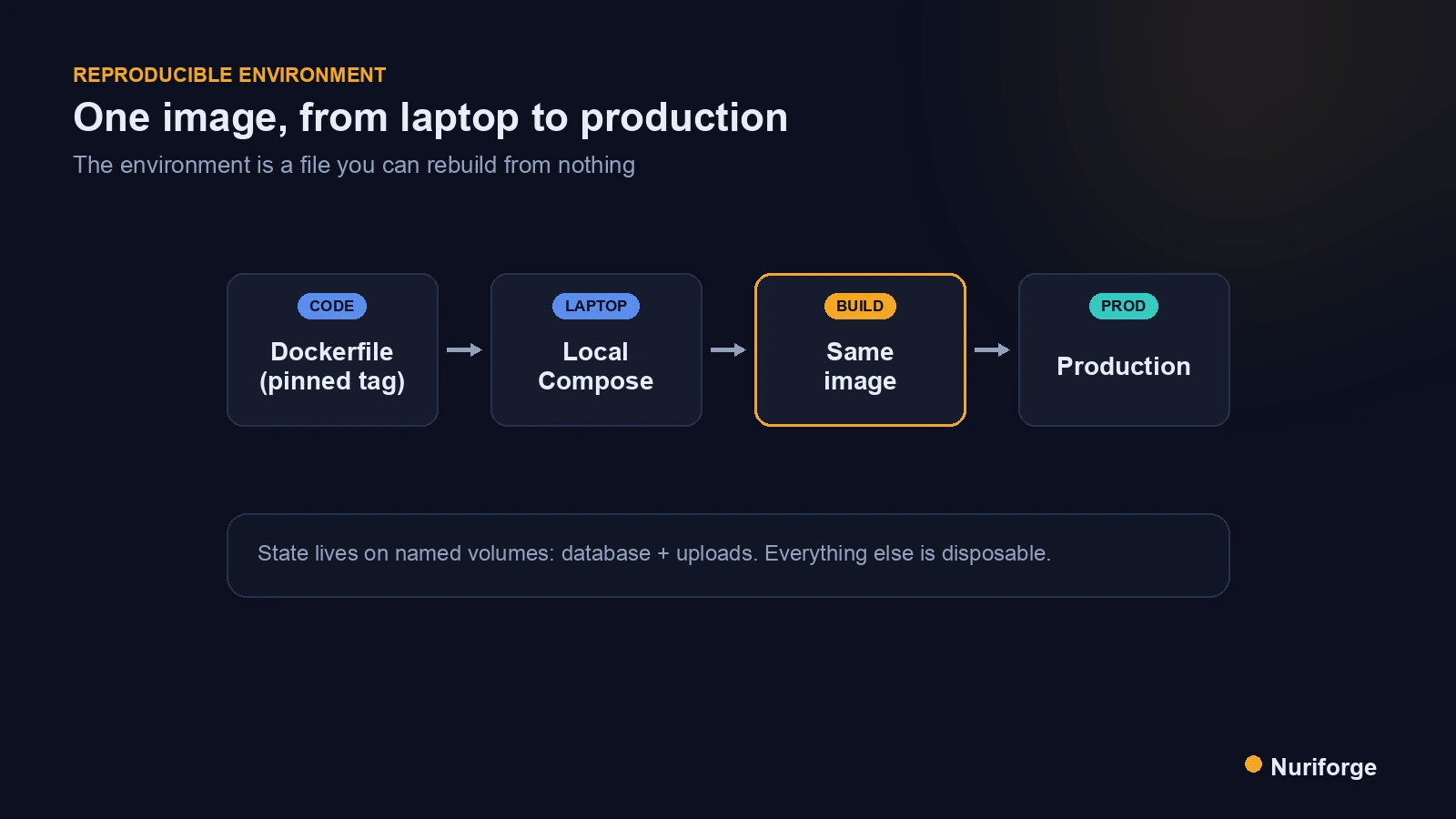
A container flips that. The environment becomes a file you can read, diff, and rebuild from nothing. Running WordPress in containers means the runtime is described in a Dockerfile and a compose file, both checked into git, so “how is this server configured” has a literal, versioned answer. If prod dies, I don’t restore a snapshot and pray — I rebuild the exact same image on new hardware in minutes.
The second win is that my local environment is honest. When the PHP version, extensions, and web server on my laptop match production byte for byte, a bug I can’t reproduce locally is rare, and when it happens it points at data or scale, not at some invisible difference between two machines. That reproducibility is the same discipline behind the rest of my stack, including the content pipeline I run: describe the system in code so it behaves the same every time.
The image is the contract
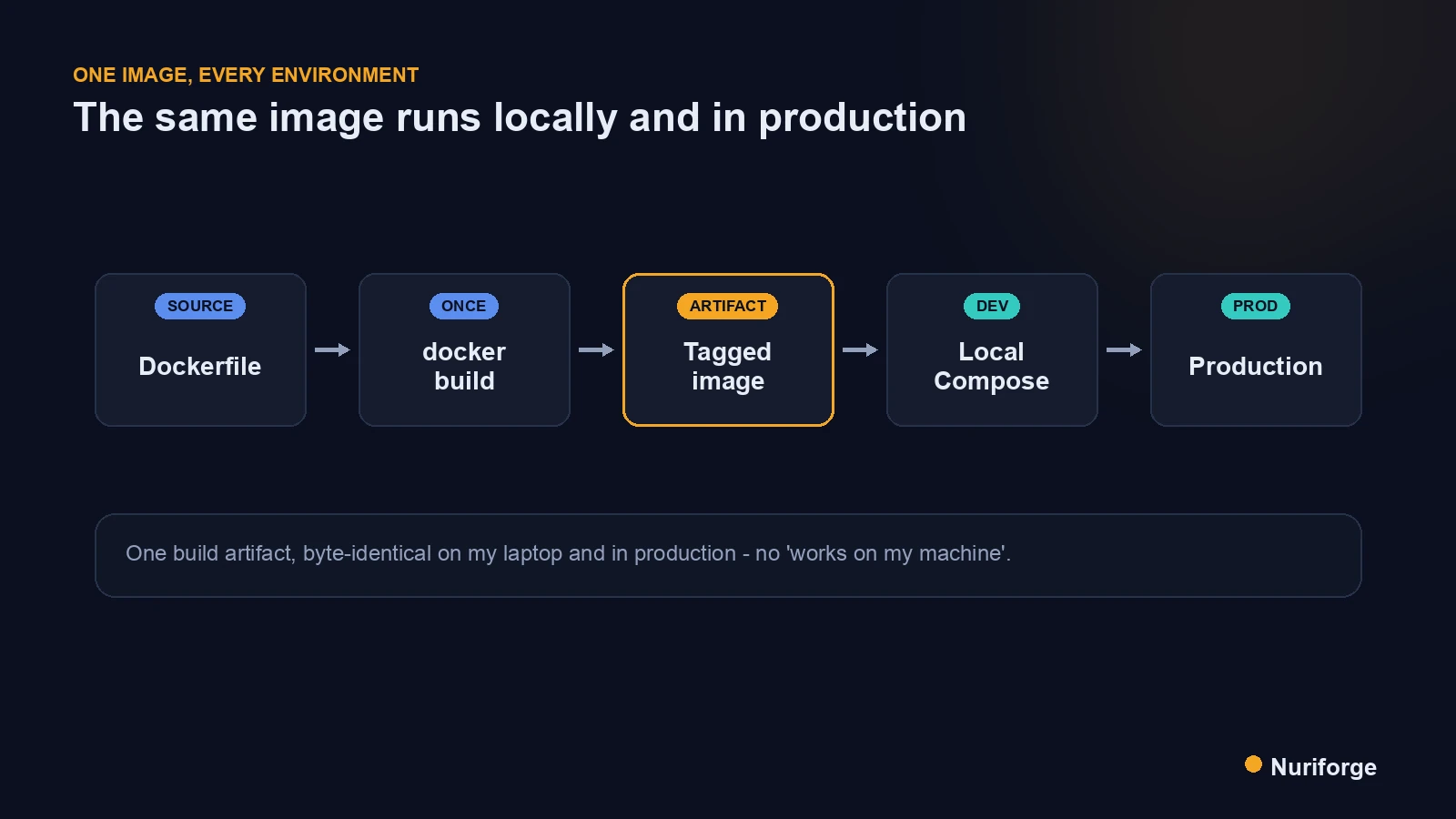
The core idea is that the image is a contract: it pins exactly what runs. I start from the official WordPress image and pin a specific tag rather than latest, because latest is a moving target that can change the PHP version under you between two builds. A tag like wordpress:6.5-php8.2-apache says precisely which WordPress, which PHP, and which web server you get, every single time.
From there, a small Dockerfile layers on whatever the site genuinely needs — an extra PHP extension, an opcache setting, an increased upload limit — and every one of those changes is now a reviewable line of code instead of a memory. The rule I hold to is that nothing goes onto a running container by hand. If I’m tempted to docker exec in and install something, that’s a signal the Dockerfile is incomplete, and the fix belongs there so the next rebuild includes it.
This is where infra habits pay off. Treat the container as immutable: you don’t patch it in place, you build a new image and replace the old one. That single rule — changes go into the image, never onto the instance — is what keeps “reproducible” from quietly becoming “reproducible except for the six things I did live.”
One compose file, from laptop to production
WordPress is never one process; it’s a small system, and Compose is how I describe that system. A typical docker-compose.yml defines three services that talk over a private network: the WordPress container itself, a database (MariaDB or MySQL), and an object cache like Redis. Each service pins its own image tag, and the whole thing comes up with a single command. The Docker Compose documentation covers the file format in depth, but the shape matters more than the syntax: one file, several services, one network.
Locally I bring the stack up, WordPress reaches the database by service name rather than an IP, and the site is running in under a minute. The value is that this same topology is what ships. Production uses the same service definitions with production values injected as environment variables — database credentials, salts, debug flags — so the difference between my laptop and the live site is a set of variables, not a different architecture.
Keeping secrets out of the image is non-negotiable here. Credentials and keys arrive at runtime through environment variables or a secrets mechanism, never baked into a layer, because anything committed into an image is effectively public to anyone who can pull it. The image is the same everywhere; only the injected configuration changes.
Volumes: what persists and what is disposable
The mental split that makes containerized WordPress click is this: the container is disposable, but some data absolutely is not. Two things must survive a container being destroyed and rebuilt — the database and the uploads directory. Both live on named volumes mounted into the containers, so I can throw away and recreate the WordPress container all day without losing a single post or image.
Core files, plugins, and themes are a more interesting question. Because they ship inside the image, a rebuild replaces them — which is exactly what you want if plugins and themes are managed as code and installed at build time. If instead you let WordPress write plugins into a mounted volume, you’ve quietly reintroduced the drift a container was supposed to remove, because now the running site contains things your image doesn’t know about. I keep managed code in the image and reserve volumes for genuine user data.
The test I use is blunt: could I delete every container right now, run the stack back up, and lose nothing but a few seconds? If the answer is no, something stateful is living in the wrong place, and I go find it before it finds me during an outage.
Where containers actually bite you
The first surprise is file permissions. WordPress inside the container runs as a specific user, and when you bind-mount a directory from your host during development, the user IDs on either side may not match — so WordPress either can’t write uploads or writes them owned by a user your host can’t touch. On Linux especially, matching the container’s user to your host user, or setting ownership deliberately, saves an afternoon of “why can’t it save this file.”
One of those bites is the cache layer, and I break down every layer of it, from PHP to the CDN edge, in WordPress Caching Explained by Someone Who Runs Infra.
The second is plugins that assume they can write to disk. Caching and image-optimization plugins love to drop files into wp-content, and in an immutable-image world those writes either vanish on rebuild or fail outright. The fix isn’t to fight the plugin; it’s to decide up front which directories are writable volumes and configure the plugin to use them, or to replace disk behavior with the object cache the stack already provides.
The third bites at the edge: HTTPS, ports, and the reverse proxy. The WordPress container shouldn’t terminate TLS or know your public domain; a proxy in front handles certificates and forwards traffic, and WordPress just needs the right site URL and to trust the proxy headers. That proxy is also where most of the work of hardening a self-hosted WordPress install ends up — rate limiting, the WAF, blocking what you don’t expose — so the container itself stays small and boring. Get that wrong and you get redirect loops or mixed-content warnings that look like WordPress bugs but are really networking. None of these are dealbreakers — they’re just the specific places the abstraction leaks, and knowing them up front is most of the battle.
Containerized versus a hand-built server
Neither approach is free. A hand-built LAMP server is faster to stand up the very first time and has no container layer to reason about; the cost is that it drifts and can’t be reproduced. Containers cost you an image and compose file to maintain and a bit of a learning curve; the payoff is that the environment is versioned, disposable, and identical everywhere. For a site I intend to run for years, that trade is not close.
| Hand-built server | WordPress in containers | |
|---|---|---|
| Environment definition | Lives in the machine’s history | A Dockerfile + compose file in git |
| Local vs production parity | Two servers that drift apart | The same image, different variables |
| Rebuild after failure | Restore a snapshot and hope | Rebuild the exact image in minutes |
| Where state lives | Mixed through the filesystem | Named volumes: database + uploads |
| Applying a change | Edit the running box | Build a new image, replace the old |
FAQ
Is running WordPress in containers good for production, or just local development?
Both. The whole point is that the same image you test locally is what runs in production, so containers are a production strategy first and a local convenience second. Plenty of large WordPress sites run in containers; the requirements are persistent volumes for the database and uploads, a reverse proxy for TLS, and a way to inject secrets at runtime.
Do I lose my posts and images when a container restarts?
Not if you set it up correctly. The container is disposable, but the database and the uploads directory live on named volumes that survive the container being destroyed and rebuilt. If restarting a container loses data, something stateful is stored inside the container instead of on a volume, and that needs fixing.
Should I use the official WordPress image or build my own?
Start from the official image and pin a specific tag, then layer your own small Dockerfile on top for extra PHP extensions or settings. You get the maintained base plus a versioned record of your customizations. Avoid the latest tag, which can change the PHP version between builds without warning.
Where do plugins and themes go in a containerized setup?
Manage them as code and install them at build time so they ship inside the image. If you let WordPress write plugins into a mounted volume instead, you reintroduce the environment drift containers are meant to remove, because the running site now contains code your image doesn’t describe.
How do containers handle HTTPS for WordPress?
The WordPress container usually doesn’t terminate TLS. A reverse proxy in front handles certificates and forwards traffic, while WordPress is configured with the correct site URL and told to trust the proxy’s forwarding headers. Getting those headers wrong is a common cause of redirect loops and mixed-content warnings.
My Thoughts
What changed for me isn’t speed — a container doesn’t make WordPress faster to write posts in. What changed is that the environment stopped being a mystery I maintained by memory. When I can read the exact runtime in a file, rebuild it from nothing, and trust that local matches prod, the whole category of “it broke and I don’t know why the servers differ” mostly disappears. For someone who has spent two decades being paged for environment problems, that quiet is the entire point. Containers won’t fix a bad plugin or a slow query, but they’ll stop you from ever again guessing how your own server is configured.