Here is the trap the docs skip over: a REST update can return a cheerful 200 OK and still save nothing. The first time I tried to edit live WordPress posts through the API, the response looked perfect, the status was green, and the change never reached the page. Nothing errored. That gap between “the request succeeded” and “the content actually changed” is where careless automation quietly corrupts a real site. This is the exact sequence I use now — fetch, back up, patch, push, verify — so I never trust a status code that lies.
Why a REST update can return 200 and still not save
A 200 from the REST API means the request was accepted, not that your field changed the way you expected. The most common reason for a silent no-op is permissions: if the authenticated user lacks the unfiltered_html capability, WordPress strips or rewrites parts of your content on the way in, so what you sent and what got stored are different. The response still comes back green, because from the API’s point of view nothing failed — it just sanitized your payload first.
The second reason is that you sent the wrong field, or the right field in the wrong shape. Posts have both a rendered content.rendered and a raw content.raw, and you can only write the raw form. Send a key the endpoint ignores and you get a tidy success with no effect. So the first rule of editing through the API is to stop reading the status code as proof. The proof is the stored content, read back afterward. I check the returned object’s own content.raw against what I intended, and I treat a matching diff, not a 200, as success.
Your local file is not the live post
The mistake underneath most broken edits is treating a file on your machine as the source of truth. It usually is not. The live post has been through the block editor, maybe touched by hand, maybe carrying schema or shortcodes a plugin injected. Your local draft knows none of that. Push it wholesale and you do not “update” the post — you replace a living thing with a stale snapshot, dropping every change that happened after you last exported.
So the live version is always the thing you edit, and you get it by fetching with the edit context. A request to the post endpoint with ?context=edit returns content.raw, the actual stored markup, rather than the filtered public render. That raw string is your real starting point. Everything else in this workflow — the backup, the patch, the verify — operates on what the API hands back, never on a file I assume is current. If you want the wider picture of where this fits, it is one gate inside the content pipeline I run.
The safe sequence to edit live WordPress posts
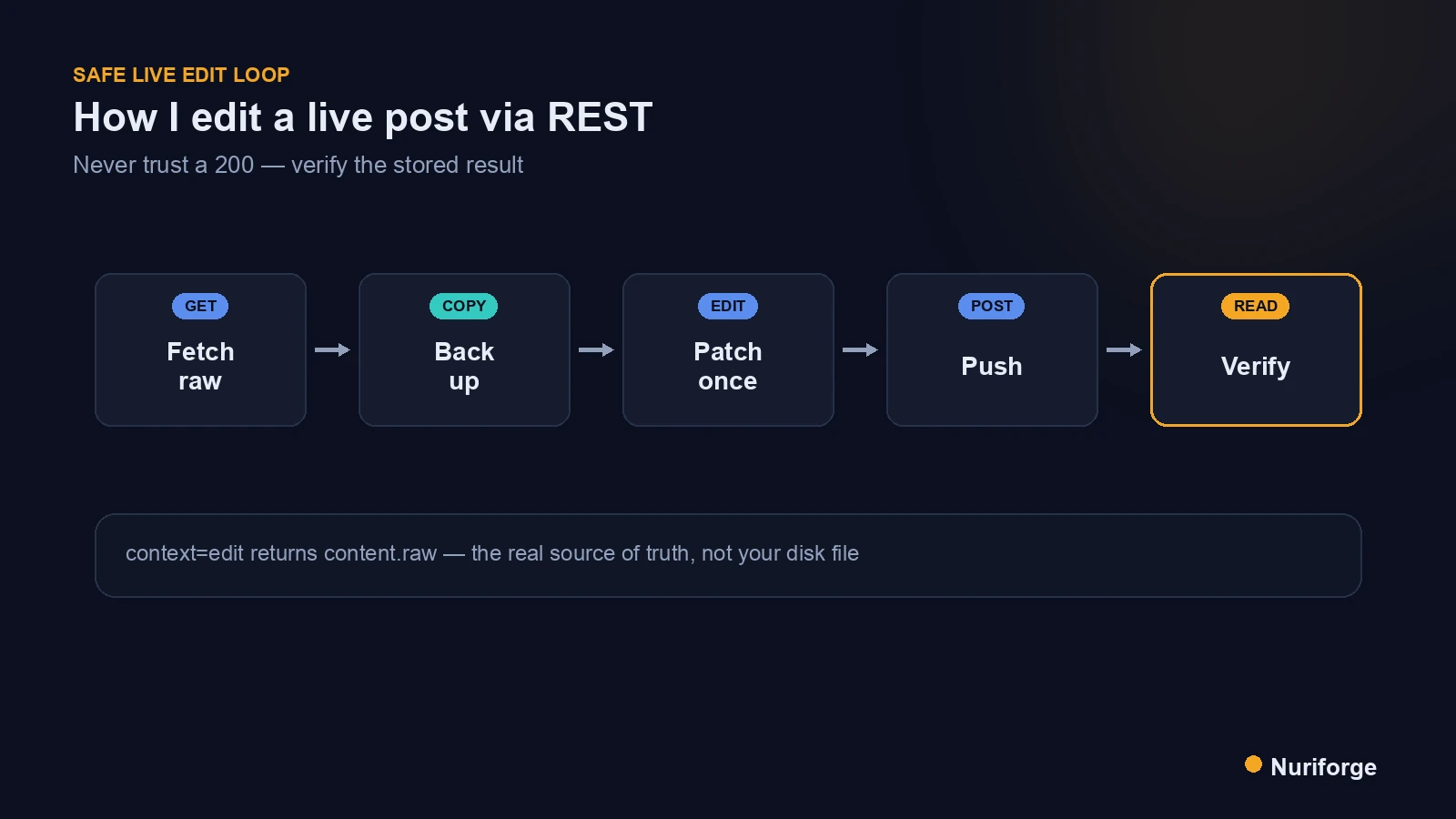
The whole reason I can edit live WordPress posts without holding my breath is that the process is fixed and boring. Five steps, in order, every time. Fetch the raw content with context=edit. Write that exact string to a timestamped backup file so I can restore in one command. Make one narrow, targeted change in memory. Push only the changed field. Then read the post back and confirm the change is really there.
Two details make this reliable rather than hopeful. First, the authenticated account needs the right capability; an application password tied to an editor-or-above user with unfiltered_html is what lets your markup survive intact. The Posts endpoint reference lists exactly which fields are writable and what each returns. Second, I never run a change against production that I have not run against a single post first. One post, verified end to end, then the batch — never the reverse.
Patch surgically, never push the whole file
A surgical edit means I change the smallest region that has to change and leave the rest of the stored markup byte-for-byte identical. If I am inserting a call-to-action block, I find the anchor, insert once, and touch nothing else. The raw content I push differs from the raw content I fetched by exactly the bytes I meant to change and no more. That discipline is what keeps an edit from becoming an accidental rewrite.
Scale the same surgical patch to fifty posts and two new things break, block markup and redirects; that is the subject of Bulk Editing WordPress Without Breaking Gutenberg or 301s.
It also depends on knowing which context you are reading. Fetch without context=edit and you get the rendered HTML, which is not what is stored and not what you can safely write back. The global parameters documentation covers context and field selection. Before I push, I run an invariant check on the new string: does it still contain the same number of headings, the same table wrappers, and does every application/ld+json block still parse? If any of those shifted when they should not have, the patch is wrong and I do not push it.
One more habit makes surgical edits safe to repeat: an idempotent marker. When I insert a block, I wrap it with a comment the script can search for, and the insert runs only when that marker is absent and the anchor appears exactly once. That way running the same edit twice does nothing the second time, instead of stacking a duplicate block on top of the first. The guard is cheap to write and it turns a risky one-shot into something I can re-run without watching it — which is what you want when the same fix has to touch more than one post.
Verify twice: the REST response and the live page
Verification is not one check, it is two, because the two things they prove are different. The first check reads the post straight back through the API with context=edit and confirms the stored content.raw contains my change. That proves the write landed. The second check loads the public URL and confirms the change actually renders to a visitor. That proves nothing downstream — caching, a sanitizer, a plugin filter — ate it between storage and display.
Scheduled posts add a wrinkle worth naming: they have no public page yet, so the second check cannot run against a live URL. For those I verify only through the API, reading the raw content directly, and re-check the rendered page once the post goes live. The point of doing both is that a green response and a correct-looking page are separate claims, and I have been burned by trusting either one alone. Read the stored bytes, then read the rendered page, and only then call the edit done.
| Whole-file push (what breaks) | Fetch, patch, verify (what I do) | |
|---|---|---|
| Source of truth | Local file, possibly stale | Live content.raw via context=edit |
| Blast radius | Every field, whole post replaced | Only the bytes that must change |
| Success signal | The 200 status code | Read-back of the stored content |
| Recovery | Whatever it overwrote is gone | Restore from the timestamped backup |
| Scheduled posts | Silently clobbered, no page to notice | Verified through the API directly |
FAQ
Why does my WordPress REST API update return 200 but not change anything?
A 200 means the request was accepted, not that your field saved. The usual causes are a missing unfiltered_html capability, which makes WordPress sanitize your payload, or writing to a field the endpoint ignores. Read the post back with context=edit and compare the stored content.raw to confirm the change actually landed.
What is the difference between content.rendered and content.raw?
content.rendered is the filtered public HTML the site displays, and content.raw is the actual stored markup you can write to. You only get content.raw by fetching with context=edit as an authenticated user. Always edit the raw form, because pushing the rendered version back is not a valid update.
Do I need special permissions to edit live WordPress posts through the API?
Yes. You authenticate as a user with edit rights, typically through an application password, and for markup like schema or custom HTML to survive intact that user needs the unfiltered_html capability. Without it, WordPress strips or rewrites parts of your content while still returning a success response.
How do I avoid overwriting content that changed on the live site?
Never push a local file wholesale. Fetch the current content.raw first, patch only the region you need to change in memory, and push just that field. Because you started from the live version, you cannot drop edits that happened after your last export.
How do I verify a REST edit actually worked?
Verify twice. Read the post back through the API and confirm the stored content.raw contains your change, then load the public URL and confirm it renders. For scheduled posts there is no public page yet, so verify through the API and re-check the rendered page once it goes live.
My Thoughts
The thing that changed how I work on live sites was small: I stopped believing the response. A status code describes an HTTP transaction, not your intent, and the two agree only when you make them. Once I treated the read-back as the real result — the stored bytes, not the green light — the whole class of “why didn’t that save” mysteries went away. Editing production through an API is not risky because the API is dangerous; it is risky because it is polite, and it will tell you everything went fine while quietly doing nothing. Fetch, back up, patch, push, verify. Boring is the point.