The upload came back as 403 with the reason storageQuotaExceeded, and my first thought was that I had filled a drive somewhere. I had not. The account in question owned nothing at all. That response is what service account storage quota exceeded looks like when the problem is not capacity but ownership, and it took me longer than I would like to admit to see the difference. Authentication had succeeded. The token was valid, the scopes were right, the API accepted the request. There was simply nowhere for the file to land.
What the error actually means
A service account is an identity, not a person with a Google account behind it. It can be granted permission to read and write things that already exist, and for a long time that was enough for everything I asked of it. What it does not have is storage of its own. Google removed the storage allocation that service accounts once carried, so a service account can hold permissions on a folder without being able to own a single byte inside it.
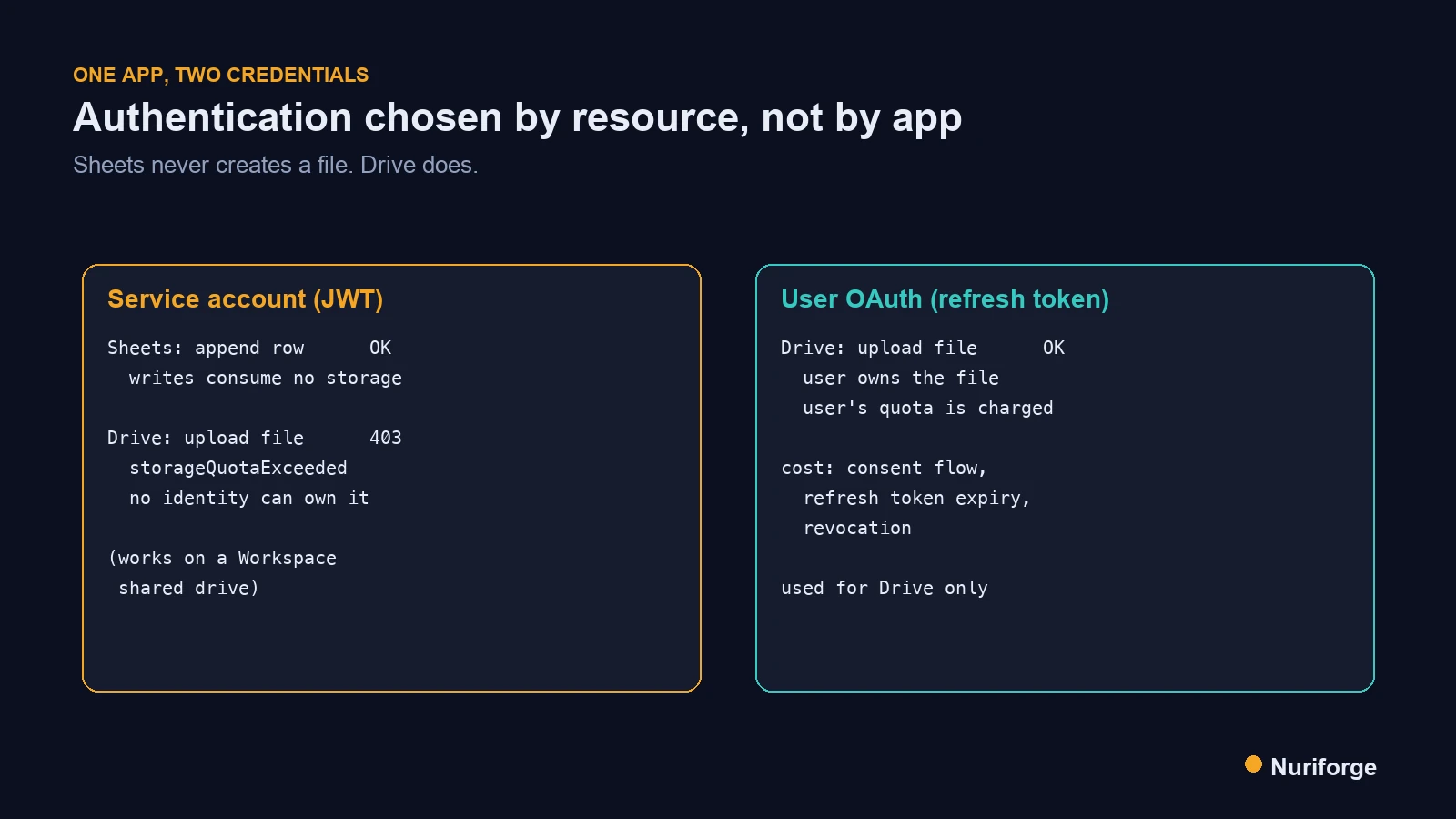
That distinction is invisible until you try to create a file rather than modify one. Reading a spreadsheet, appending a row, listing a folder — none of those need an owner, because the owning account already exists. Uploading a new file does. Someone has to be recorded as the owner, and the bytes have to be charged against somebody’s quota. When the only identity on the request is a service account, there is no such somebody, and the API returns the same error it would return to a person whose drive is genuinely full.
The wording is what makes this slow to diagnose. storageQuotaExceeded reads like a capacity problem, so the instinct is to go looking for the drive that is full. In my case the honest description would have been closer to “this identity cannot own files”, which is a different sentence entirely and would have saved me an evening. The Drive API error reference is accurate about the fix but shares the same framing.
Why Sheets kept working while Drive failed
What confused me most was that half the integration was fine. The system I was building takes a document dropped into Slack, extracts the billing fields with a vision model, files the original away, and appends a row to a spreadsheet. The spreadsheet half had been working for days on the same service account. Only the file half broke.
Once the ownership framing clicked, the asymmetry stopped being strange. Appending a row to an existing spreadsheet creates no new object in Drive. The file is already there, already owned by me, already counted against my quota; the service account is only editing content inside it. Uploading a document does create a new object, and that object needs an owner. The service account could do the first thing forever and would never manage the second.
This is the part I wish I had internalised earlier, because it generalises. The question to ask about any Google API call is not “does this identity have permission” but “does this call create something that has to belong to someone”. Permission and ownership are different axes, and a service account sits at a peculiar point on them: high on permission, absent on ownership.
The fix: two auth models in one app
The obvious move is to swap the whole integration to user OAuth and be done with it. I did not do that, and I would push back on it as a default. Sheets never had the problem, and moving it to OAuth would have bought nothing while adding a refresh token to the list of things that can expire at three in the morning. So the application now carries two credentials and picks by resource.
Sheets keeps the service account. It authenticates with a JWT, it needs no interactive consent, it survives redeploys with nothing but an environment variable, and because its writes never create files it never touches the quota question. This is the boring, durable half and I want it to stay boring. If you are wiring up a spreadsheet-backed automation and nothing else, you probably never need to read the rest of this post — the same idea shows up in how I handle credentials for automating WordPress backups to object storage, where the destination owns the bytes and the script only needs permission to put them there.
Drive gets user OAuth. The application holds a refresh token for my own account and uploads as me, which makes me the file owner and charges the storage to my quota — exactly what would happen if I dragged the file into the folder by hand. The code checks for the three OAuth environment variables and only builds the OAuth client when all three are present; if they are absent it falls back to the service account JWT. That fallback is not a safety net for consumer accounts, and I want to be precise about it: it works on a Workspace shared drive, where the drive itself owns the files, and it fails exactly as before on a personal My Drive.
The fallback that hides the problem
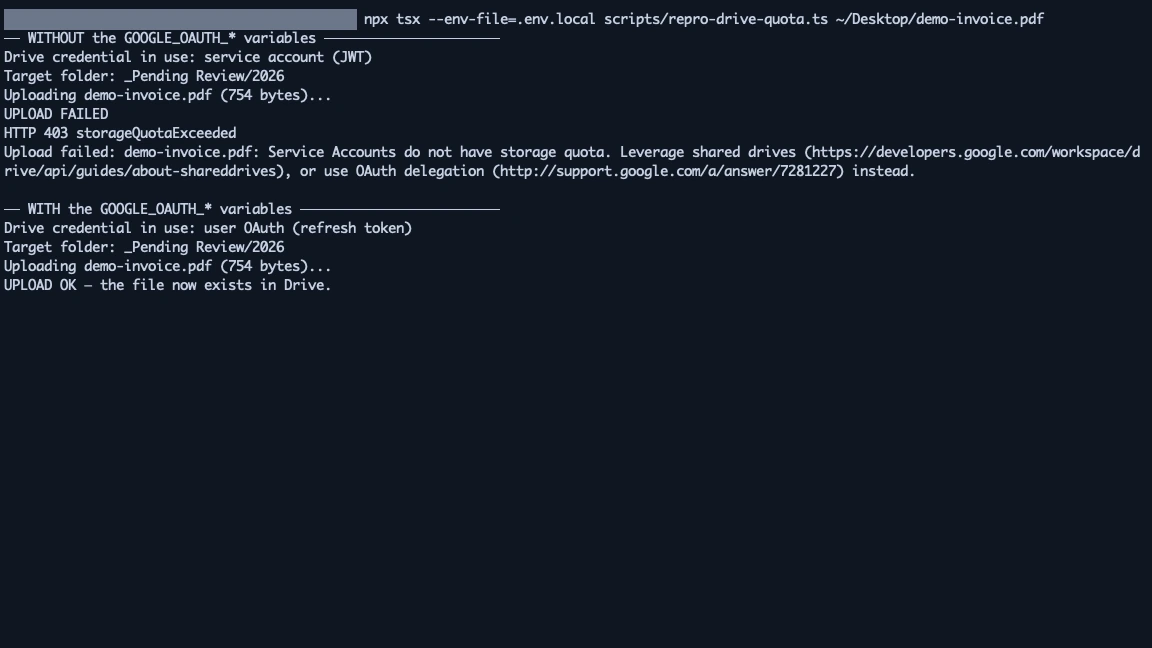
There is a detail in that arrangement worth stating on its own, because it is the part I would get wrong again. The code checks whether all three OAuth variables are present and quietly uses the service account when they are not. It does not refuse to start. It does not warn. A deploy that loses one environment variable therefore does not fail loudly — it reverts to the path that produced the original error, and the first sign of trouble is a document that never arrives.
On a Workspace shared drive that fallback is genuinely correct, which is why it exists. On a personal My Drive it is a trapdoor. The behaviour is defensible; what is not defensible is leaving it undetectable, and the honest reading is that a missing credential should be noisy rather than merely different. It also means the failure is trivially reproducible: remove the three variables locally and the application walks straight back into it, which is exactly how the screenshot below was made.
What user OAuth costs you
Splitting the credentials solved the upload, and it introduced a class of problem the service account never had. A JWT is derived from a key you hold; it does not expire in any way you have to think about. A refresh token is granted by a consent screen, and it can stop working for reasons that have nothing to do with your code.
The ones worth planning for are listed plainly in Google’s OAuth 2.0 documentation: a refresh token issued while the app is still in testing mode expires within days rather than lasting indefinitely, so a project that works all week can fail the following Monday for no visible reason. Revoking access in your account settings kills it immediately. Changing the granted scopes invalidates it. And because the token now represents a person rather than a service, the area affected by losing it is wider — it is my account, not an isolated identity, that the application is acting as.
None of that argues against the choice; it argues for treating the token as an operational dependency rather than configuration you set once. The practical consequences are small but real: the consent flow has to be repeatable by a script rather than remembered as a sequence of clicks, and a failure to refresh needs to surface somewhere a human will see it. On the day the token dies, the failure mode looks like documents quietly not being filed, which is the worst kind of quiet.
When a shared drive is the better answer
User OAuth fit my situation because the destination was a personal My Drive and the person who owns it is me. That is not everyone’s situation, and I would choose differently in an organisation.
On Google Workspace, a shared drive is owned by the organisation rather than by an individual, and files created inside it are charged to the organisation’s pool. A service account added as a member can create files there without ever hitting the ownership wall, which means the whole problem in this post simply does not arise. No consent screen, no refresh token, no dependency on one person’s account continuing to exist. If I were building the same intake system for a team, that is the design I would reach for, and the JWT fallback already in the code would become the primary path rather than a degraded one.
| Consideration | Service account (JWT) | User OAuth |
|---|---|---|
| Identity | The application | A specific person |
| Can own new files | No, outside a shared drive | Yes, in that user’s Drive |
| Storage charged to | Nothing — no quota exists | The user’s quota |
| Interactive consent | Never needed | Required once, repeatable by script |
| Credential lifetime | Key, effectively indefinite | Refresh token, revocable and expirable |
| Best fit | Sheets writes; shared drives | Uploads into a personal My Drive |
Reading that table back, the split stops looking clever and starts looking obvious, which is usually the sign that a design decision was made for the right reason. Each API is asked for the thing it is good at. The failure only felt mysterious because I had assumed one credential should serve the whole integration, and that assumption was never examined until something refused to work.
FAQ
Why does a service account get storage quota exceeded when its drive is empty?
Because the error is about ownership, not capacity. Service accounts have no storage allocation, so there is no quota for a new file to be charged against. An empty drive is not the same as an available one.
Can a service account upload files to Google Drive at all?
Yes, into a shared drive, where the drive itself owns the files rather than an individual account. The failure is specific to creating files somewhere that expects a personal owner, such as a consumer My Drive.
Why do Google Sheets writes still work with a service account?
Appending a row modifies a file that already exists and already has an owner. Nothing new is created, so no quota is consumed and the ownership question never comes up.
Is it acceptable to use two different Google credentials in one application?
Yes, and it is often the smaller change. Moving a working Sheets integration onto OAuth adds a refresh token you did not need. Selecting the credential per resource keeps the fragile dependency confined to the part that actually requires it.
How long does a Drive OAuth refresh token last?
Indefinitely once the app is published, but only days while it is still in testing mode, which surprises people whose project worked all week and then stopped. Revoking access or changing scopes also invalidates it.
My Thoughts
Twenty years in infrastructure has taught me that the errors that cost the most time are the ones whose wording points somewhere plausible and wrong. A message about quota sends you to look at capacity. Nothing about the response suggested that the fix was to stop asking the application to own things and start asking it to act on my behalf.
What I took from it is a question I now ask earlier: which identity is supposed to own the thing this call creates? If the answer is “nobody in particular”, the design is not finished yet. The split I ended up with is not elegant, exactly — two credentials is more surface than one — but it puts each dependency where the risk actually lives, and that has held up better than the tidier version I started with.